Directable
One of the first browser-based builders for digital signage.
Read the case study: how it was designed →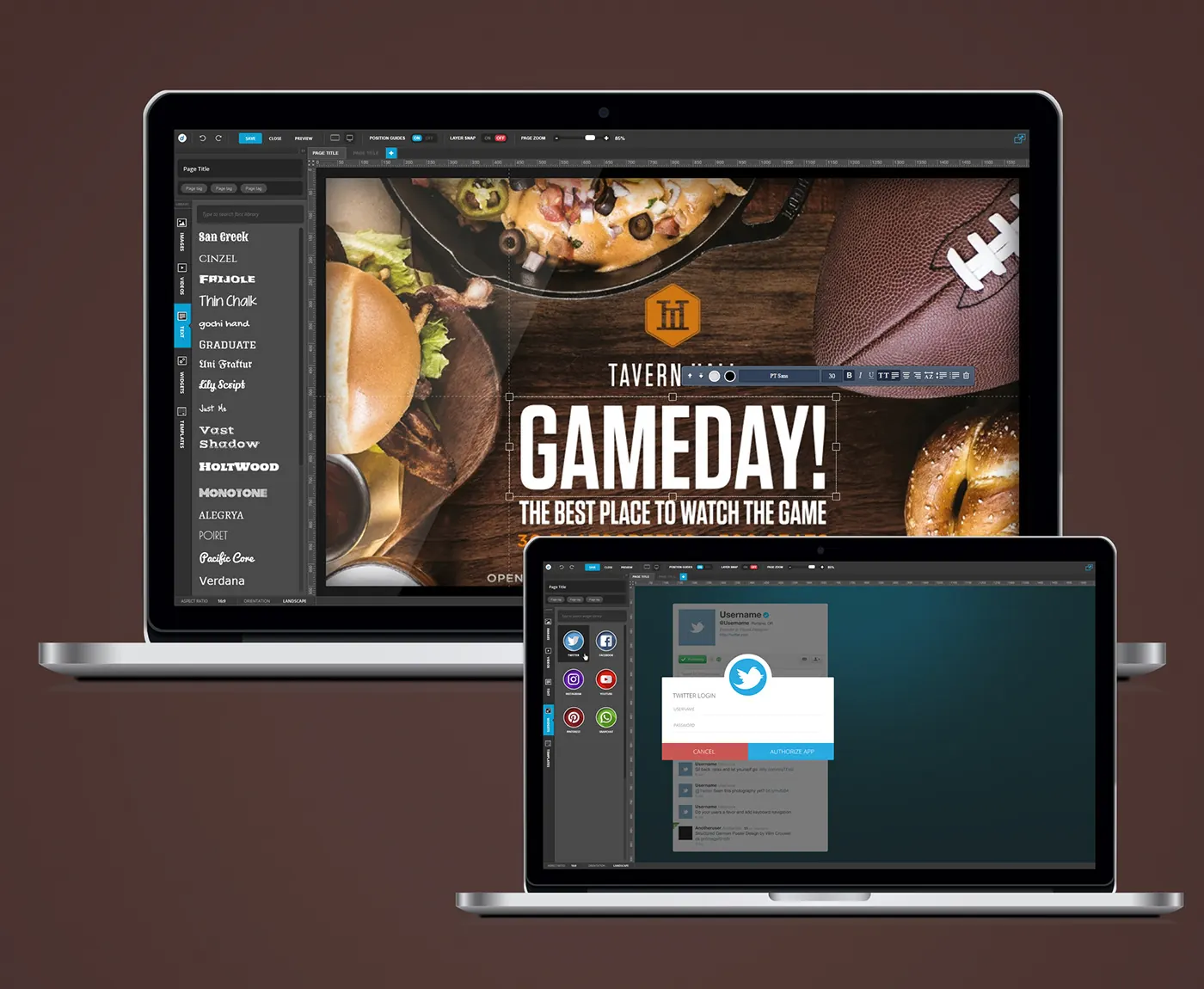
- Role
- Lead UI/UX Designer
- Platform
- Web
- Software
- Photoshop, Illustrator
- Design system
- Reusable visual templates and brand assets
The problem
Making content for screens meant desktop tools and specialists. The company wanted anyone to build and schedule signage in the browser.
Features
- ·Canvas slide editor with guides and layer snapping
- ·Libraries for images, video, text, widgets and templates
- ·Social media widgets with live feeds
- ·Aspect ratio and orientation for each screen
Approach
- 01
Browser canvas
ProblemMaking content for screens meant desktop tools and specialists.
SolutionDesigned a browser-based slide editor with rulers, page zoom, position guides and layer snapping, plus save, close and preview in the top bar.
- 02
Content libraries
ProblemPeople without design training needed material ready to use.
SolutionA side rail holds libraries for images, videos, text, widgets and templates. Text comes with a searchable font library and an inline formatting bar.
- 03
Live widgets
ProblemSignage goes stale when every update has to be made by hand.
SolutionSocial widgets for Twitter, Facebook, Instagram, YouTube and Pinterest pull live feeds, with account authorisation handled inside the editor.
- 04
Screen formats
ProblemEvery screen has its own shape and orientation.
SolutionAspect ratio and orientation are set per slide from the editor footer, so the canvas matches the screen it will play on.
Design library
- Editor cyan#2BAAE1Save, active states
- Off red#C85751Off, cancel
- Top bar#373737Toolbar
- Panel#242424Library panel
- Field#303030Inputs and tags
- Label grey#898989Secondary labels
- Display · 26/700Page Title
- Title · 15/600Twitter login
- Body · 13/400Type to search font library
- Caption · 10/700POSITION GUIDES
Inline text toolbar
Floats above a selected text layer: order, colours, font, size, style and alignment.
- Toolbar
- Layer order
- Text and fill colour
- Font and size
- Style
- Case and alignment
On/off switch
Two-segment switch in the top bar for position guides and layer snapping.
- Top bar slot
- Label
- Track
- On segment
- Off segment
Library rail tab
Vertical tab that opens the images, videos, text, widgets or templates library.
- Tab
- Library icon
- Vertical label